
OSL Agent Settings are found by clicking on your Name top right
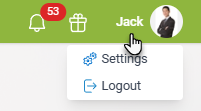
Your program settings are organised across the following tabs.
Details tab
Contains your contact details, default listing type, social media links, and office photo.
OSL User tab
Allows you to customise how you use the OSL Agent program.
Profile tab
Includes your public profile information, testimonials, privacy statement, and social media links used on OSL websites.
Alerts tab
Controls email alerts so you can track how your listings are performing.
Printing tab
Used for printing flyers. This normally does not need to be changed, as it uses your office’s default formats.
Email tab
Sets your email signature for messages sent from OSL Agent.
People tab
Used to manage your contact groups.
TXT tab
Shows TXT messages you have sent.
Teams tab
Used to create and manage your Team more...
Templates tab
Manage your templates, including office templates available to you.
Plans tab
Manage your activity plans.
Send tab
Used for sending communications and related actions.
Docs tab
Provides access to office documents.