
Listing → Details tab ( Commercial listing type)

TABLE OF CONTENTS
- Total area
- Areas
- Area Range
- Description
- Land Area
- Features
- Amenities
- Viewing
- Legal
- Flood
- Seismic Rating
- Energy rating
There are two options when loading the Area for a Commercial listing, use the option that best suits how you are using the program.
Total area
Enter the total Floor area available when you created your listing (i.e. the New button or Edit the Address button)


This is a common way to load the total Floor or Land Area for your listing.
Areas

If you want to be more specific about the listing enter each of the areas available that make up your listing.
e.g. The amount office space, warehouse, showroom etc.
By using the individual areas means that you can match to your potential tenant requirements more accurately.
Click on the Add button to add each new area. The total area available will be calculated for you.
When entering each area you can enter
- Floor – e.g. Ground level (optional)
- Type – e.g. Office, Mezzanine
- sqm – the floor area available
- $sqm – the price per sqm (optional)
The total area and lease amount per annum is automatically calculated as you enter each area
Area Range
Area Range - You can enter the Area range available or From - To

Note all portal website recognize an Area Range

Use this option when you want to market your listing with an Area range e.g. 200sqm – 500 sqm of available space.
Click on the Edit button to enter an area range.
Then click on the save button
Description
The description box can be used to add a general description of the listing.
This will be printed on OSL Office Info sheet flyers
Land Area
Use the land area if your listing is an Industrial land for Sale or Lease
This is the same Land Area box that is on the Listing Address window
Features
You can enter your own additional features here.

Commercial features are displayed on OSL websites as well as exported to any website using the REA listing data feed.
This option allows you to enter any information that you need. Examples might be;
- Building bicycle racks
- 4-pipe fan coil air conditioning
- Onsite gym
- Onsite child care facilities
Amenities
Shared GymShared SaunaShared Swimming PoolShared Spa
Viewing
The Commercial viewing details are displayed on your OSL website as well as exported to the trademe website.
Legal
- Year built or New
- Local Authority
- Zoning – The local council zoning area for the property.
- Rates pa – The amount of the local council per annum rates.
- CV/RV rateable value – The rateable value (RV) or capital value (CV) of a property is the value set by councils and local authorities for the purpose of charging rates.
- CV year – The year when the RV was calculated.
- Legal comments – you can enter the Listing Dp, Lot details and any other legal information about the listing
- Title -The title of the property
Fee Simple, Leasehold, Strata, Strata(L/h), Cross-Lease, Cross-Lease (L/h), Unknown or N/A
Leasehold option will display additional boxes for the lease expiry and the amount of the lease per year.
Mortgagee Sale – use this option if the sale has been order by the vendors bank
Flood
Flood & natural hazard information
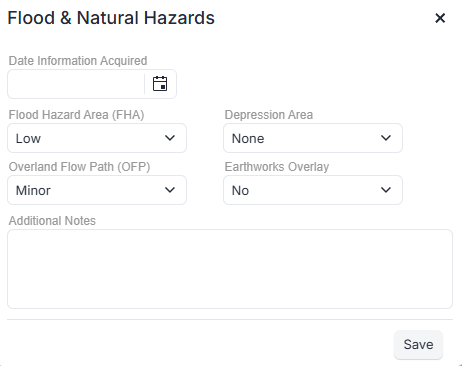
Date Information Acquired: Date
Flood Hazard/Extent Area (FHA): Low - medium - High - None
Depression Area: 10 year - 100 year - minor - none
Overland Flow Path (OFP): Major - Moderate - Minor - none
Earthworks Overlay: Yes/No Minor - None
Seismic Rating
When loading a Commercial Listing you can enter the seismic rating for the building
Seismic measurements for Buildings
Seismic ratings are only displayed on OSL websites.
Seismic performance measurements for buildings are;
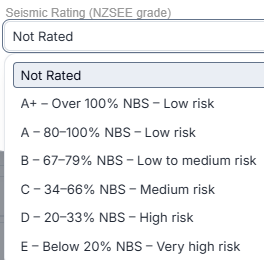
NZSEE grading definitions
Empty Not Rated
A+ – Over 100% NBS – Low risk
A – 80–100% NBS – Low risk
B – 67–79% NBS – Low to medium risk
C – 34–66% NBS – Medium risk
D – 20–33% NBS – High risk
E – Below 20% NBS – Very high risk
The NBS refers to the New Building New Zealand Standards*
Energy rating
Star energy rating system
NABERSNZ rates the actual energy performance of buildings over 12 months, on a 1 – 6 star scale. It can be applied to base buildings, tenancies or whole buildings
0 Very Poor
1 Poor
2 Below Average
2.5 to 3 Average
4 Good
5 Excellent
6 Market leading
NABERS is the energy performance rating tool for Australian office buildings.
NABERSNZ is the energy performance rating tool for New Zealand office buildings.
Adapted from the Australian NABERS tool for New Zealand, it is licensed to the Energy Efficiency and Conservation Authority and delivered by NZGBC.