
Staff > Profile tab

On the Staff Profile tab you manage your Staff/Agents profile, social media and testimonials.
The Agents profile, should work like an 'elevator pitch' briefly describe the agents expertise, skills, and achievements to encourage the prospective vendors to consider that you are the sales person for them

TABLE OF CONTENTS
The Staff profile settings are only used on OSL powered websites.
Notes. 
- As you make your changes save and click on the eye button on the Profile settings tab to view the staff profile live on your website.
- Agents with OSL Agent Live can maintain their own profiles & testimonials in Agent Settings.
Profile Settings tab
Publish Staff Profile on website
This option controls if the agent profile is published or not. Publish Staff profile, select the Publish Staff profile option to Yes to display on your website..
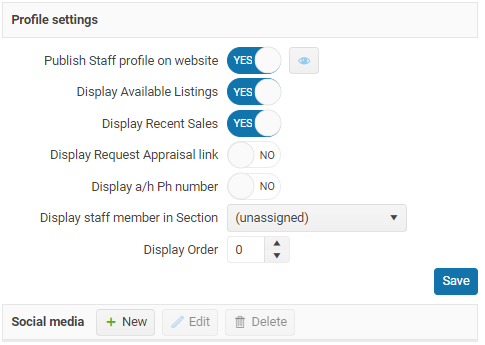
Publish Staff profile on website
When a Staff member leaves your company all you have to do is remove the agent from your OSL website.
- Display Available & Sold Listings - Do you want the agents available listings displayed on their website profile page
- Display request an Appraisal link
- Display After Hours contact phone number - This option will display the staff members after hours contact phone number on their profile page.
- Display staff member in Section & display order - The default display order is in First Name order but this option allows you to display the Staff member in one of these sections, you can also over ride the default display order.
Social media links
Load each social media link the staff member wants displayed on your OSL website.
Please make sure your agent sends you each social media profile as a full link/URL that you can copy and paste in (not just the account name or “@handle”). This ensures we can add the correct links without guessing.
Examples of what to request:
Facebook: https://www.facebook.com/username
Instagram: https://www.instagram.com/username
LinkedIn: https://www.linkedin.com/in/username
YouTube: https://www.youtube.com/@username
TikTok: https://www.tiktok.com/@username
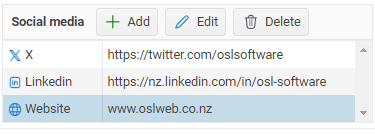
If you add a new social media link after you have created your email signature delete your signature and auto create again.
Your social media links are automatically added to your email signature and displayed against your profile on your OSL company website. more...
As you make your changes click on EYE button on the Profile settings tab to view the staff profile live on your website.
Soical media links; Facebook, Instagram, Kakao Talk, Linkedin, Pinterest, Snapchat, Tiktok, WeChat, website, X, Youtube
Profile details tab

Tagline
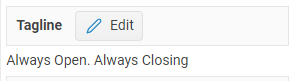
Select the Edit button to edit the staff tagline
It is a short text description of the Agents business' or slogan.
Profile
This should be a personal description of who you are what do you do and where you do it .
Make sure that you only copy/paste PLAIN text into the staff profile box. If you do not use plain text the copied text will overwrite the formatting used on your website.
Your profile is displayed on the agent OSL website profile page and some portal websites
Awards
List you industry awards
Note. Awards from your real estate group are added by head office.
Rate my Agent
You can enter your rate my agent URL and this will be displayed on your Agent profile page on a n OSL website.
Testimonials tab
The importance of testimonials.
A good testimonial is a short testimonial that tells a story
Getting your testimonials in front of potential clients is crucial for building trust and credibility. Testimonials serve as social proof and can influence potential clients' decisions.
Remember that authenticity is key. Don't fabricate or exaggerate testimonials, as this can damage your reputation if discovered. Encourage genuine feedback from your clients, and use those testimonials that best reflect the real value you provide to your customers.
Testimonial Cards
What people say about Agent
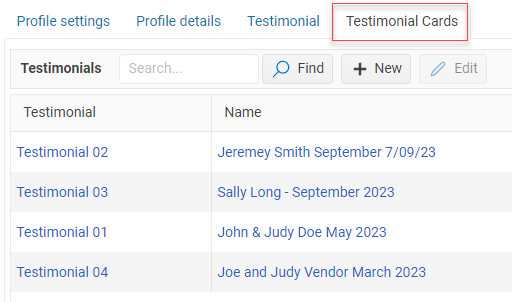
Use this option so that your Agent testimonials appear as a 'card' or a panel on your agents profile page.
using this option add each testimonial as a separate record.
Editing text
Agent SEO & Tracking
Make it easier for potential buyers and sellers to find your agents online and get more value from your digital marketing.
OSL Websites include Search Engine Optimisation (SEO) and Tracking Pixel settings for individual agent profile pages.
Get Found on Google
Every agent has their own profile page on your OSL Website. You can customise how that page appears in search engine results.
OSL makes this easy by automatically generating suggested SEO information using the agent's existing profile details.
You can review and update:
Page Title – Create a clear, search-friendly title (up to 60 characters). Leave blank to use the automatic title containing your website name, agent name and role.
Meta Description – Add a short, engaging description (up to 160 characters) to encourage people to visit the agent's page.
Keywords – Enter relevant search terms, separated by commas, to help organise your SEO information.
Google Preview: See how your agent's profile may appear in Google search results before saving.
Tip: A good page title and description can help your agent stand out in search results. Google may choose to display different text.
Make Your Digital Advertising Work Harder
Running Facebook, Google, LinkedIn or TikTok advertising?
Add tracking pixels and tags to individual agent profile pages, helping you to measure the effectiveness of your online marketing.
OSL Agent profile pages support:
Meta (Facebook) Pixel
Google Tag (GA4 / Google Ads)
Google Tag Manager
LinkedIn Insight Tag
TikTok Pixel
These integrations can help you understand visitor activity, measure advertising results and support remarketing campaigns, subject to your tracking and privacy settings.
How to Get Started
Open the agent's profile in OSL and locate the new Search Engines and Tracking Pixels sections.
Review the automatically suggested SEO title, description and keywords.
Make any changes to better promote the agent and their local market.
Check the Google Preview.
Add any tracking IDs you use for digital advertising.
Save your changes.
Available for OSL Websites only.
Give your agents a stronger online presence and make the most of every visit to their profile page with OSL Websites.
NEXT Alerts tab