
Listings → Reports
These are the listing reports that are available. Individual listing reports are available on the listing page
TABLE OF CONTENTS
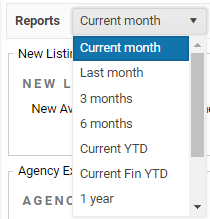
Use the Date range drop down.
New Listings
New Listings added to your office for the date range that you select
Agency Expiry
Upcoming or Expired agency listings. This report will show you all the listings that are about to expire (Available & Conditional listings)
Expired Agency - We have recently added the option to show all listings that are over their agency expiry date.
Use this report option to make sure that your listings are up to date.
Listings on the Internet
Listings on the Internet shows which websites each listing is sent to. You can choose to select for an indivudal Agent or all Listings in the office.
Only listings with a website update error
This option is for errors only. Listings that failed to update on a website are shown with a red dot for that site, so you can see which listings need attention.
Web Views
Weekly web hits. Summary shows the total hits for each listing. Detail shows per website
New listings Ranking
Ranks Agents by New Listings for the date range
Date Range - scroll to the bottom to select a Custom date range