
Settings > Company > People tab

There is only one setting on the Company people tab
Important: This option effects how Contacts work for all users
Agents share Contacts
This is a global setting that applies to all OSL Agent users within your company.
When Share People is set to Yes, all Agent Live users will have access to a single, shared Contacts/People database. This means that any contact added by one agent will be visible and accessible to all other agents in the office.
While contacts remain linked to the agent who originally created or manages them, the shared setting allows all agents to view and work with the full contact database, improving collaboration and reducing duplication of records.
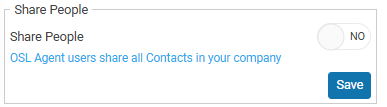
This option is not commonly used by Residential Sales offices. It is more typically utilised by Business Brokers or smaller real estate offices that benefit from sharing a single, centralised contacts database across their team.
NEXT Company Sales