
TABLE OF CONTENTS
OSL Agent users can directly record their Appraisals
An important performance indicator for successful agents is your Appraisal activity. You should know how many Appraisals it takes before you get 1 listing!
Your Appraisal can be as brief as just recording the property Address & potential Vendor, or you can create a CMA searching recent comparable sales or create a Proposal for your potential Vendor.
Making sure that you record your Appraisals is a great KPI and can also avoid any commission disputes between agents at a later date.
New Appraisal

Click on the + Appraisal button
Enter the property Address.
Start typing the street address into the Lookup Address box with the Address + suburb then clcik on the Search button to find the matching address from Google.
Select the correct address and the Street, Suburb, Postcode and Country/State boxs will fill in automatically.
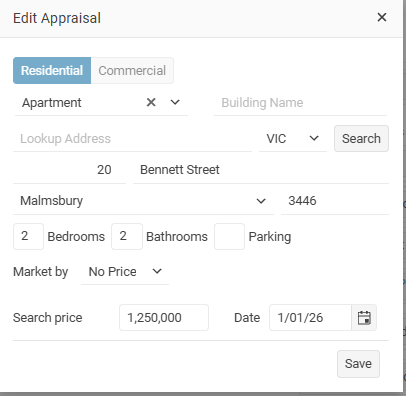
All Appraisals must have an Address. You can add further property information on the Details tab.
If the address has been entered correctly, you will be able to see the property location on the Appraisal Map tab.
It is important that the property is located correctly on the map, especially when it comes time to create a CMA for the property.
Add the Owner - they should already be a Contact in your database if not you can add them here.
Agents - if an Admin user is ebnerteing the Apprsail they can add up to 4 agents this working well when presenting a company or developr
Property information
- Floor area
- Land area
Interoir and Exterior details can also be entered.
CMA
Add a CMA report searching recent comparable sales and currently for sale.
Proposal
Create a digital email Proposal for a potential Vendor with information about yourself and your office. (New 2026)
Appraisal status
Open your Appraisal and select the status Edit button beside the status label.
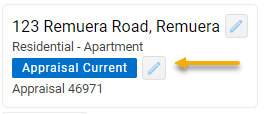
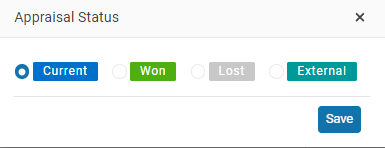
You are able to change the status of the Appraisal.
- Current – this is the status for your Current Appraisals
- Lost – it means that the potential vendor did not want to sell the house
- Convert – use this option if your Appraisal becomes a new Listing
- External – Use this option if another agency won the listing.
- Archived - tis allows you to Archive the Appraisal
Select the Covert option to create a New listing with the Appraisal details
Appraisal activity is recorded on the dashboard section.