
People > Call Manager
Manage your outbound phone calls.
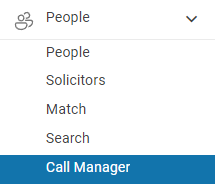
TABLE OF CONTENTS
- What is a Call Manager?
- Example phone lists
- Creating a Plan - Step 1
- Creating a plan for a property
- Edit Contact details
- Tips & Tricks
What is a Call Manager?
Call Manager is designed to help you manage your outbound calling lists and make prospecting easier to organise.
We know that making outbound calls can be one of the more difficult parts of sales. Call Manager gives you a simple system for keeping track of who you need to call, who you have already spoken to, and what follow-up action is required.
A Call Plan is a list of Contacts from your database that you intend to call. As you work through the list, Call Manager records who you have called and the actions you have taken, helping ensure that important follow-ups are not missed.
Phone calls remain an important part of successful sales prospecting. Salespeople can achieve significantly higher prospect engagement through calling than through email alone, and many of the conversations that ultimately lead to a sale happen over the phone.
That’s why we created Call Manager.
It lets you organise your calling lists, work through them efficiently, and easily keep up to date with the calls you have made, the calls still to be made, and any follow-up activity required.
Example phone lists
- Open Home visitors follow up
- A list of your past customers
- Contacts within an area
- Contacts that you have sent an Email campaign
- Contacts within a Group or Groups
- OSL users can only view your own Call Manager plans.
Creating a Plan
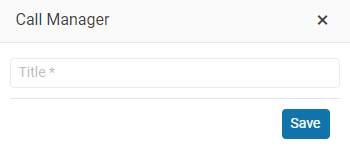
You create a plan for any group of Contacts in your database that you intend to call. You can search for a Group or filter your Buyers. You can create a Plan with any list of Contacts.
Select Tools> and then the Call Plan button

Creating a Call Plan for a Property
Call Manager makes it easy to follow up with people who attended an open home by creating a Call Plan directly from the property listing.
To create a Call Plan:
Open the Listing in OSL.
Select the People tab.
Click the Call Plan button.
By default, the Call Plan will include all contacts associated with the listing.
If you only want to include certain people, use the Select Contact checkboxes to choose the contacts you wish to add to your Call Plan.
This creates a convenient calling list, allowing you to work through your follow-up calls in an organised and efficient way.
As you make each call, Call Manager keeps track of who you've contacted, the calls you've completed and any follow-up actions required.
Tip: Try to follow up with open home visitors as soon as possible while the property is still fresh in their minds. It's a great opportunity to gather buyer feedback, identify interested purchasers and build stronger relationships with potential buyers.
Running a Call Plan
People menu > Call Manger

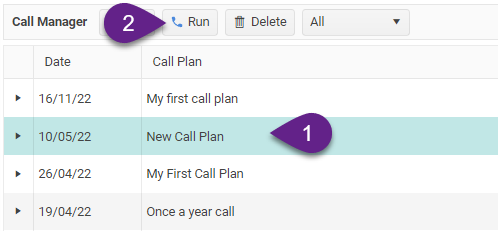
Go to People > Call Manager page and select the Call Plan that you want to run.
Select the Plan that you want to run and click on the Run button.
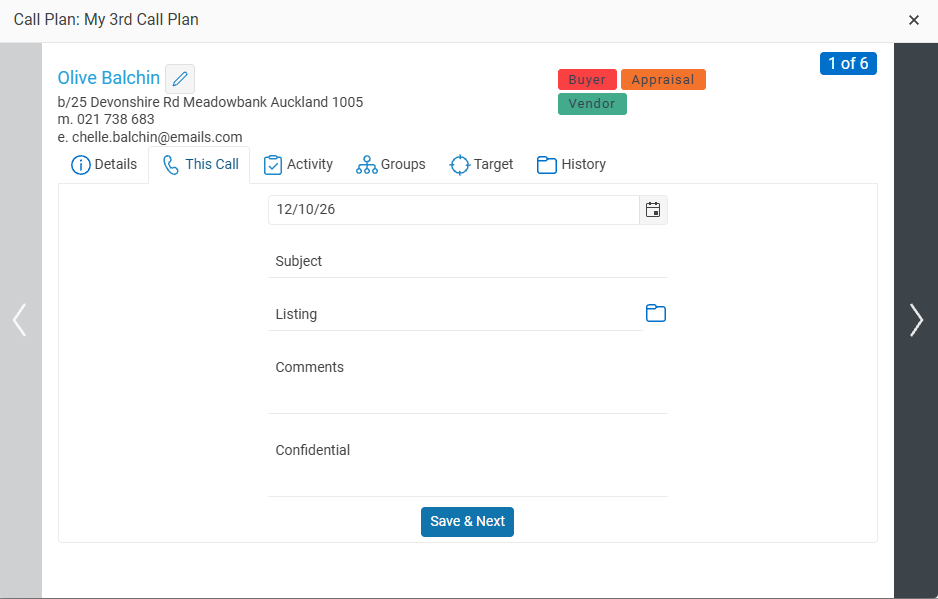
This is the first contact in your call plan list.
You can see all of the information about each Contact on each of the tabs.
Now ring them! Enter the result of your call and Enter the conversation outline when finished click on the Save & Next button.
Editing Contact Details
You can easily update a contact's details while working through your Call Plan.
To edit a contact, either:
Click the Edit button to open the contact's details.
Alternatively, click the Edit button beside the contact's name.
This allows you to keep your contact information accurate and up to date as you work through your calls.
Pausing and Resuming Your Call Plan
You don't need to complete your entire Call Plan in one session.
You can stop at any time and return to it later. Call Manager automatically remembers your progress, so when you reopen your Call Plan, you can pick up right where you left off.
Tip: Take a moment to update contact details and record any important information during or immediately after each call. Keeping your database up to date makes future follow-ups easier and more effective.
Tips & Tricks – Getting the Most Out of Call Manager
Set aside dedicated calling time. Schedule a regular time each week for making outbound calls. Treat it like any other important appointment and stick to it.
Focus on time, not the number of calls. Rather than setting yourself a target of making a certain number of calls, commit to a fixed amount of time. This takes the pressure off and allows you to focus on having quality conversations rather than simply working through a list.
Don't take rejection personally. Not everyone in your database will want to hear from you, and that's perfectly normal. If someone no longer wishes to be contacted, mark them as inactive and move on to the next person in your Call Plan. Look at the positive side — you've just made your database a little more accurate and valuable!
Record your conversations. Take a few moments after each call to record any important notes or outcomes. This will make your next conversation easier and more personal.
Always plan your next action. If someone asks you to call back in a few weeks or months, record the follow-up so you don't forget. Consistent follow-up is often what turns a contact into a client.
Keep your Call Plans manageable. Work with smaller, targeted lists rather than trying to call everyone in your database. This makes the process less daunting and helps you maintain momentum.
Remember: Successful prospecting isn't about making the most calls. It's about consistently making contact, building relationships and following up.